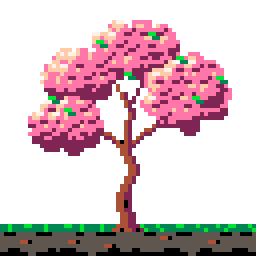
Cherry tree from seed to bloom (grid)
The tree-growth benchmark, r1. A 64×64 cherry tree in bloom in PICO-8, then a 21-frame growth from a seed built backwards from that exact tree: sprout with two seed leaves, sapling, a trunk thickening bottom-up, green masses swelling into the final shapes, buds, and bloom spreading from the tips with drifting petals. The final frame matches the step-1 export byte for byte. Each step ran in its own fresh omp session (claude-opus-5-5), launched through Herdr one after another, with the step text sent verbatim after the `/skill:studio ` command prefix. The operator created the document and loaded the PICO-8 palette before step 1, and handed step 2 a copy of the step-1 file. No image model, no reference, no messages beyond the step text. The sessions ran from the repository root, where gallery/prompts is readable; their logs show no read of gallery/ at all. The MCP server and skills were the 0.5.0 code built from the repository before the version bump, with `draw` kind `grid`, which the sessions used; the Aseprite extension in the window still reported 0.4.0 and lacked the later Lua fixes (a frame reorder attempted in the tree run failed on it).
- Author
- Nik Fedorov @fedorovvvv
- Date
- Plugin
- v0.5.0
- Harness
- omp
- Model
- claude-opus-5-5 ran every step
- Reference
- none — drawn from the prompt alone
- Benchmark
- Cherry tree — from seed to full bloom revision 1
- Tags
- nature animation growth benchmark 64x64 pico-8
The prompts, verbatim
Step 1:The tree
The document is already open: 64×64 pixels, RGB, with the PICO-8 palette loaded (16 colours). Use only those 16 colours — do not add, widen or replace the palette. This brief is complete: do not ask me to confirm it. Decide anything it leaves open yourself and list those decisions in your final report. Coordinates below are 0-based pixels, x to the right, y down. Draw ONE frame: a cherry tree in full bloom standing on a strip of ground. A later step will animate this tree growing from a seed, so build it as a clear structure — trunk, a few main branches, blossom masses — rather than texture noise. Composition - Transparent sky. Front view, the tree centred. - Ground strip across the full width, y 56–63: a grass edge on y 56–57 (#008751 with #00e436 tufts), soil below it (#5f574f with #000000 shading and a few #ab5236 pebbles). - Trunk rising from the ground with its base centred on x 30–33, slightly flared roots visible where it meets the grass. The trunk is 4 px wide at the base, tapers upward, and curves gently in an S. - Around y=36 the trunk splits into exactly 3 main branches (left, centre, right), each splitting again at least once. Branches thin to 1 px at the tips. - The canopy spans roughly x 8–56 and y 6–38: three or four rounded blossom masses with gaps between them where branches show through. Colours (PICO-8 hex values) - Bark: #ab5236 lit side, #7e2553 shadow side, #000000 for the deepest crevices. - Blossoms: #ff77a8 base, #ffccaa and #fff1e8 highlights, #7e2553 shadow. A few green leaves (#00e436, #008751) peek out between the blossoms. Style - Light from the upper left: lit sides of the trunk and the blossom masses on the left and top, shadow on the right and underneath. - Blossoms are drawn as clusters of 2–5 px clumps with a clear light and shadow side, not single-pixel noise. No stray pixels, no anti-aliasing against transparency. Layers, exactly these names, bottom to top: `ground`, `trunk` (trunk, roots and every branch), `canopy` (blossoms and leaves). No other layers. Before you finish: look at the result, run validate, and fix what it reports. In your final report, describe the branch structure (where each main branch splits) and any decision you made that the brief did not specify.
Step 2:The growth
The open document holds a blossoming cherry tree on a strip of ground (canvas 64×64, PICO-8 palette, layers `ground`, `trunk`, `canopy`). Keep the palette — use only its 16 colours. This brief is complete: do not ask me to confirm it. Decide anything it leaves open yourself and list those decisions in your final report. Coordinates are 0-based pixels, x to the right, y down. Animate this tree growing from a seed into exactly the tree in the document. 18 to 24 frames in total, one tag named `grow` covering every frame, direction forward. The final frame IS the existing tree, pixel for pixel, on `ground`, `trunk` and `canopy`. Keep the current art as the last frame and build every earlier stage backwards from it: each earlier frame is a smaller version of the same structure, so every branch grows along the path its final branch takes. Stages, in this order 1. Seed, 2 frames: no tree. A 2×2 seed lies half-buried in the soil directly under the trunk's final base. 2. Sprout, 2–3 frames: the soil cracks open around the seed, a few dirt crumbs pop up, then a thin green stem rises with two round seed leaves unfolding. 3. Sapling, 3–4 frames: the stem turns to bark colour from the bottom up and grows taller, the first side branches appear, a few small green leaves. 4. Young tree, 4–5 frames: the trunk thickens from 1 px to its final width from the bottom up, the 3 main branches extend along their final paths and split, and green leaf clusters swell into the shapes of the final blossom masses. 5. Budding, 2–3 frames: the green masses reach their final outlines and pink buds dot them. 6. Bloom, 3–4 frames: the buds burst open cluster by cluster, spreading from the branch tips inward, until the canopy matches the final tree. A few loose petals drift down and to the right across these frames. Rules - The `ground` layer is identical on every frame. Soil cracks, crumbs and falling petals go on a new layer named `fx`, which is empty on the final frame. - Growth is continuous: the trunk and branches never shrink, never jump to a new position and never change path between frames. The trunk base stays on x 30–33 throughout. - The pace eases: very little changes per frame at the start, the biggest change per frame comes in the middle (a growth spurt), and the last frames settle in small steps. - Timing (milliseconds per frame): the seed frames at least 400 each, the growth frames 80–150, and the final frame at least 1500 so the finished tree holds before the loop restarts. Before you finish: check the whole cycle as a filmstrip, check at least one young-tree frame with onion skin against its neighbours, compare the final frame against the tree you started from, and run validate. Fix what it reports. In your final report, give the frame plan: frame number, stage and duration for every frame.
Benchmark results
12 of 13 criteria passed.
- Passed:
validate passes with no unaddressed errors (warnings may stand if the report names and justifies them).
Step 1,
tree-validate - Passed:
Every colour is on the PICO-8 palette and the palette still has exactly the 16 PICO-8 entries (validate check palette, palette op="get").
Step 1,
tree-palette - Passed:
The preview reads at a glance as a cherry tree in bloom — trunk, branches showing through gaps, and pink blossom masses are each distinguishable without the ascii grid.
Step 1,
tree-read - Passed:
The brief is followed: layers exactly ground/trunk/canopy (sprite_info), ground on y 56–63 with grass on top, trunk base on x 30–33 and 4 px wide, exactly 3 main branches splitting around y=36, canopy inside roughly x 8–56 and y 6–38 as 3–4 masses with gaps.
Step 1,
tree-spec - Passed:
Light reads from the upper left on the trunk and on every blossom mass, and the blossoms are clumps with a light and shadow side rather than single-pixel noise (validate strays clean, look op="ascii").
Step 1,
tree-shading - Passed:
The sprite has 18–24 frames and tag op="list" shows a forward tag named `grow` covering all of them.
Step 2,
grow-tagged - Passed:
The final frame matches the step-1 tree pixel for pixel — an image diff of its PNG export against the step-1 export shows no changed pixel — and `fx` is empty on that frame.
Step 2,
grow-final - Passed:
The filmstrip shows all six stages in order — seed, sprout with two seed leaves, sapling, thickening young tree, green masses with buds, bloom spreading from the tips.
Step 2,
grow-stages - Passed:
look op="diff" with layer="trunk" between consecutive growth frames shows only additions and re-shading along the existing structure — no branch shrinks, jumps or changes path, and onion skin on a young-tree frame shows its branches lying on the paths of the final ones.
Step 2,
grow-continuous - Passed:
The ground layer never changes (look op="diff" with layer="ground" reports nothing changed between any two frames) and the trunk base stays on x 30–33 on every frame.
Step 2,
grow-ground - Failed:
look op="diff" percentChanged between consecutive frames is small at the start, largest in the middle and small again at the end — the growth visibly spurts and settles.
Step 2,
grow-easing - Passed:
frame op="list" durations match the brief — seed frames ≥400, growth frames 80–150, final frame ≥1500 ms.
Step 2,
grow-timing - Passed:
validate passes with no unaddressed errors and the palette is still the 16 PICO-8 entries.
Step 2,
grow-validate
Validate reports
What the plugin's own lint said at the end of each step.
- Step 1 Passed Score 100 0 errors, 0 warnings
- Step 2 Passed Score 65 0 errors, 7 warnings
Craft
25% from 1 judge, each axis scored 0–4 against the rubric.
| Judge | Read | Form | Motion | Cohesion | Appeal | Note |
|---|---|---|---|---|---|---|
| fedorovvvv human | 1 | 1 | 1 | 1 | 1 | Overall 2/10, given as one number; each axis set to round(2/10 × 4) = 1. |
| Mean | 1.0 | 1.0 | 1.0 | 1.0 | 1.0 | 25% |
More views
The tree, 4× , step 1

All 21 frames, 2× , step 2
Files
| File | Role | Step | Size | Download |
|---|---|---|---|---|
| grow.gif The growth, 4× | Cover | 2 | 5.2 KB | Downloadgrow.gif |
| tree.aseprite Step 1: the tree | Aseprite source | 1 | 1.4 KB | Downloadtree.aseprite |
| tree.png The tree, 4× | Frame | 1 | 2.4 KB | Downloadtree.png |
| grow.aseprite Step 2: tag grow, 21 frames | Aseprite source | 2 | 12.6 KB | Downloadgrow.aseprite |
| grow-filmstrip.png All 21 frames, 2× | Filmstrip | 2 | 9.7 KB | Downloadgrow-filmstrip.png |