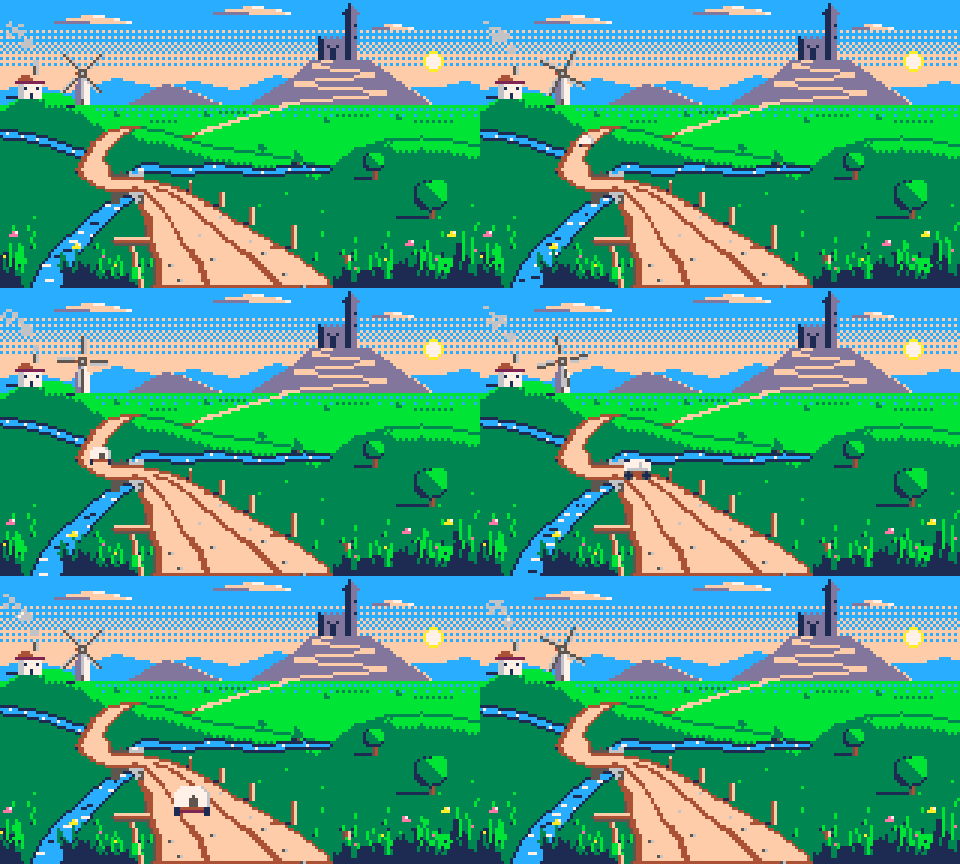
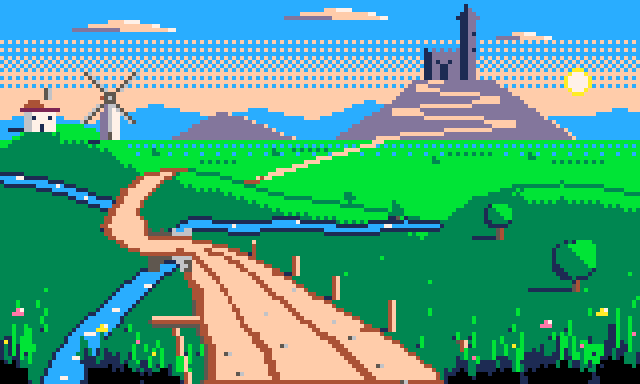
Winding road through the valley
The winding-road benchmark, r1. A 160×96 PICO-8 valley with a road sweeping from the bottom edge over a bridge, behind a hill and up four switchbacks to a castle gate, then a 24-frame seamless loop: a windmill turning, a river flowing toward the viewer, chimney smoke, swaying grass and a covered wagon driving the whole road toward the camera. Each step ran in its own fresh omp session (claude-opus-5-5), launched through Herdr one after another, with the step text sent verbatim after the `/skill:studio ` command prefix. The operator created the document and loaded the PICO-8 palette before step 1, and handed step 2 a copy of the step-1 file. No image model, no reference, no messages beyond the step text. The sessions ran from the repository root, where gallery/prompts is readable; their logs show no read of gallery/ at all. Step 1 needed two infrastructure restarts before the run recorded here: the first session found the aseprite MCP server unable to reach a stale 0.1.1 bridge left from an older install and stopped without drawing; the second asked to kill that bridge, the operator cancelled it, killed the stale bridge, and started this clean session. Neither aborted session touched the document. Step 2 validate is recorded from the palette, strays, layers and animation checks; the full run times out on this canvas through the MCP client.
- Author
- Nik Fedorov @fedorovvvv
- Date
- Plugin
- v0.4.0
- Harness
- omp
- Model
- claude-opus-5-5 ran every step
- Reference
- none — drawn from the prompt alone
- Benchmark
- Winding road — deep-perspective landscape and ambient loop revision 1
- Tags
- landscape environment perspective animation loop benchmark 160x96 pico-8
The prompts, verbatim
Step 1:The landscape
The document is already open: 160×96 pixels, RGB, with the PICO-8 palette loaded (16 colours). Use only those 16 colours — do not add, widen or replace the palette. This brief is complete: do not ask me to confirm it. Decide anything it leaves open yourself and list those decisions in your final report. Coordinates below are 0-based pixels, x to the right, y down. Draw ONE frame: a green valley in late afternoon, seen from a low hill, with a dirt road that starts right under the viewer's feet and winds all the way to a castle on a distant mountain. The road and its perspective are the subject of the picture. A later step will animate this scene, so build it on the layers listed below. Layout, back to front - Horizon line at y=34. The sun sits low on the right at about (144, 20), so light comes from the right and shadows fall to the left. - Sky, y 0–34: blue (#29adff) at the top fading to peach (#ffccaa) near the horizon, using horizontal bands and ordered dithering, not noise. Two or three flat clouds with lit right edges. The sun is a small disc (#fff1e8 core, #ffec27 rim). - Far mountains along the horizon: low-contrast silhouettes in lavender (#83769c) and blue (#29adff), no black. - A castle on the highest far peak, right of centre around x 108–120: a keep and one tall tower, drawn in lavender and dark blue (#1d2b53), lit on the right. - Midground: rolling green hills (#008751, #00e436). A river (#29adff with #fff1e8 glints, #1d2b53 banks) enters from the left edge around y=44 and winds toward the viewer, leaving through the bottom-left part of the canvas. - On a hill on the left, a farmhouse with a chimney and, beside it, a windmill with exactly 4 blades. - Foreground, bottom of the canvas: tall grass tufts and a few wildflowers (#ff77a8, #ffec27) in both bottom corners, and a wooden signpost leaning beside the near road. The darkest darks (#000000) appear only in the foreground and nearest midground. The road - It enters at the bottom edge about 60 px wide (roughly x 50–110) and narrows continuously with distance: no stretch is ever wider than a nearer stretch, and it ends 1 px wide at the castle gate. - Its route, from near to far: a broad S-curve sweeping left; across the river on an arched stone bridge (#c2c3c7, #5f574f); a bend to the right where it disappears behind a hill for a stretch; it reappears smaller on the far slope; then at least 3 switchbacks climbing the mountain to the castle gate. - Surface: packed dirt (#ffccaa lit, #ab5236 shadow) with darker edges, two wheel ruts and pebbles in the near stretch. The detail gets finer and sparser with distance until the far road is a single line. - Along the near stretch, a row of fence posts or milestones on one side that shrink and bunch closer together as they recede. Perspective and depth - Everything diminishes toward the horizon: road width, posts, trees, buildings. - Atmospheric perspective: the further away, the lighter, cooler and lower in contrast. The far mountains and castle use only lavender, blue, dark blue, peach and white. - Depth is shown by overlap: the hill must visibly hide part of the road. Layers, exactly these names, bottom to top: `sky`, `mountains`, `castle`, `hills`, `river`, `road`, `props` (bridge, farmhouse, windmill tower, signpost, fence posts), `windmill-blades` (only the 4 blades and their hub), `foreground`. Order them however the overlaps need, but keep the names and keep each element on its layer. Before you finish: look at the result (use look op="ascii" with a region to inspect details, since the canvas is larger than 64×64), run validate, and fix what it reports. In your final report, describe the road's route with approximate coordinates of the bridge, the hidden stretch and the castle gate, and any decision you made that the brief did not specify.
Step 2:The loop
The open document holds a valley landscape with a road winding to a castle (canvas 160×96, PICO-8 palette, layers `sky`, `mountains`, `castle`, `hills`, `river`, `road`, `props`, `windmill-blades`, `foreground`). Keep the palette — use only its 16 colours — and keep the picture exactly as it is wherever this brief does not ask for motion. This brief is complete: do not ask me to confirm it. Decide anything it leaves open yourself and list those decisions in your final report. Coordinates are 0-based pixels, x to the right, y down. Animate an ambient, seamlessly looping scene. Exactly 24 frames, every frame 100 ms, one tag named `loop` covering every frame, direction forward. Playing frame 24 straight into frame 1 must show no jump in any element. The existing frame is frame 1. What moves - Windmill: the 4 blades turn clockwise around a fixed hub, exactly 15° per frame, so the blades redraw through 6 distinct angles and repeat 4 times over the loop. Blade length and thickness stay the same at every angle. Only `windmill-blades` changes for this. - River: ripples and glints flow downstream, toward the viewer, along the river's course. The ripple pattern repeats every 8 or 12 frames so it closes on frame 24. Only `river` changes for this; the banks do not move. - Chimney smoke: on a new layer named `smoke`, puffs rise from the farmhouse chimney, drift to the left with the wind, grow and break up into dithered wisps, then vanish. A new puff starts every 8 frames, so three puffs are always at different heights and the cycle closes on frame 24. - Foreground grass: the tufts in `foreground` sway gently to the left and back in a 12-frame cycle (2 cycles per loop); the signpost does not move. - Wagon: on a new layer named `wagon`, a small covered wagon (cream canvas top #fff1e8, #ab5236 body, two dark wheels, no horse) travels the road toward the viewer. On frame 1 it is completely hidden behind the hill where the road disappears. It emerges, follows the road's curves and stays on the road surface, crosses the bridge, and drives out through the bottom edge, fully off canvas by frame 24. It grows steadily as it approaches — about 4 px wide when it first appears, at least 14 px wide at the bottom — and covers more ground per frame the nearer it is, as perspective demands. What stays still: `sky` (clouds included), `mountains`, `castle`, `hills`, `road` and `props` are identical on every frame. Link their cels. Before you finish: check the whole loop as a filmstrip, check the windmill and the wagon with onion skin, and compare frame 24 against frame 1 for each moving element. Run validate and fix what it reports. In your final report, give each cycle's length in frames and the wagon's width and position on frames 4, 12 and 20.
Benchmark results
14 of 14 criteria passed.
- Passed:
validate passes with no unaddressed errors (warnings may stand if the report names and justifies them).
Step 1,
land-validateOne warning: river pixels touch the canvas edge where the water enters and leaves; named and kept.
- Passed:
Every colour is on the PICO-8 palette and the palette still has exactly the 16 PICO-8 entries (validate check palette, palette op="get").
Step 1,
land-palette - Passed:
In the preview the road can be traced by eye from the bottom edge to the castle gate, and the castle, windmill, farmhouse, river and bridge are each recognisable without the ascii grid.
Step 1,
land-readEvery landmark reads; the far road and the switchbacks are thin and only just traceable.
- Passed:
The brief is followed: layers exactly sky/mountains/castle/hills/river/road/props/windmill-blades/foreground with each element on its layer (sprite_info, look with layer=…), horizon at y=34 ±1, sun low on the right with light from the right, river from the left edge toward the bottom-left, windmill with 4 blades.
Step 1,
land-specHorizon at y 34–35, sun at the upper right, river in from the left edge and out at the bottom-left.
- Passed:
The road enters the bottom edge about 60 px wide, never widens with distance, crosses the river on the bridge, is hidden behind a hill for a stretch and reappears smaller, and climbs at least 3 switchbacks to a 1 px end at the castle gate.
Step 1,
land-roadx 50–110 at the bottom, bridge at x 37–47, hidden past the crest at about (40–47, 41) and back at (61, 45), four switchbacks, 1 px end at the gate (110, 20). The hidden stretch is left undrawn rather than covered by the hill layer.
- Passed:
Perspective holds: fence posts or milestones shrink and bunch with distance, surface detail thins with distance, the far mountains and castle stay light, cool and low-contrast with no black, and #000000 appears only in the foreground and nearest midground (look op="ascii" by region).
Step 1,
land-depthFive posts shrink from 11 to 4 px and bunch with distance; #000000 only in the foreground grass.
- Passed:
frame op="list" shows exactly 24 frames, every one 100 ms, and tag op="list" shows a forward tag named `loop` covering all of them.
Step 2,
loop-frames24 frames at 100 ms, forward tag loop 1–24.
- Passed:
Played on repeat the GIF has no hitch: look op="diff" from frame 24 to frame 1 changes about as much, and in the same places, as frame 1 to frame 2 — only the next step of each cycle, plus the wagon's absence.
Step 2,
loop-seamlessComposite diff 24→1 changes 172 px, inside the 178–515 px range of the other steps; the wagon is absent on both.
- Passed:
sky, mountains, castle, hills, road and props are identical on every frame — their cels are linked (cel op="list") or look op="diff" with each layer reports nothing changed.
Step 2,
loop-staticsky, mountains, castle, hills, road and props cels are linked on all 24 frames.
- Passed:
Onion skin on `windmill-blades` shows 4 blades turning clockwise by an even step around a fixed hub, with the same blade length and thickness at every angle, repeating every 6 frames.
Step 2,
loop-windmillwindmill-blades shows 6 distinct images repeating every 6 frames around a fixed hub.
- Passed:
Ripples visibly travel downstream toward the viewer and the pattern repeats with a period that divides 24; the banks do not move.
Step 2,
loop-riverThe river layer repeats every 8 frames; banks untouched.
- Passed:
On the `smoke` layer puffs leave the chimney, rise, drift left, grow and break into dithered wisps before vanishing, with a new puff every 8 frames.
Step 2,
loop-smoke - Passed:
The wagon is hidden behind the hill on frame 1, then stays on the road surface through every curve and over the bridge, grows steadily from about 4 px to at least 14 px wide, moves further per frame as it nears, and is fully off the bottom edge by frame 24 (onion skin on `wagon`, the reported positions).
Step 2,
loop-wagonHidden on frame 1, only the canopy tip above the crest on frame 2, 4 px wide on frame 4, 9 px on the bridge, 13 px on frame 20, gone by frame 24. It switches to a side view while it drives across the bridge.
- Passed:
validate passes with no unaddressed errors and the palette is still the 16 PICO-8 entries.
Step 2,
loop-validate
Validate reports
What the plugin's own lint said at the end of each step.
- Step 1 Passed Score 95 0 errors, 1 warning
- Step 2 Passed Score 100 0 errors, 0 warnings
Craft
28% from 2 judges, each axis scored 0–4 against the rubric.
| Judge | Read | Form | Motion | Cohesion | Appeal | Note |
|---|---|---|---|---|---|---|
| fedorovvvv human | 0 | 0 | 0 | 0 | 0 | Overall 1/10, given as one number; each axis set to round(1/10 × 4) = 0. |
| gpt-5.5 model | 2 | 2 | 2 | 3 | 2 | The scene and the road read, but the distant landmarks and the moving details are muddy, and the animation feels mechanical rather than atmospheric. |
| Mean | 1.0 | 1.0 | 1.0 | 1.5 | 1.0 | 28% |
Run metrics
What each step cost, as the harness reported it.
| Step | Minutes | Tool calls | Output tokens | Cost |
|---|---|---|---|---|
| 1 | 21.1 | 71 | 111,950 | $6.04 |
| 2 | 22.7 | 96 | 90,816 | $6.41 |
| Total | 43.8 | 167 | 202,766 | $12.45 |
More views
The valley, 4× , step 1

All 24 frames , step 2
Files
| File | Role | Step | Size | Download |
|---|---|---|---|---|
| loop.gif The loop, 3× | Cover | 2 | 42.9 KB | Downloadloop.gif |
| valley.aseprite Step 1: the valley | Aseprite source | 1 | 4.6 KB | Downloadvalley.aseprite |
| valley.png The valley, 4× | Frame | 1 | 6.7 KB | Downloadvalley.png |
| loop.aseprite Step 2: tag loop, 24 frames | Aseprite source | 2 | 48.0 KB | Downloadloop.aseprite |
| loop-filmstrip.png All 24 frames | Filmstrip | 2 | 22.8 KB | Downloadloop-filmstrip.png |