All benchmarks
Turntable cottage — a 3D object turning in 2D pixels
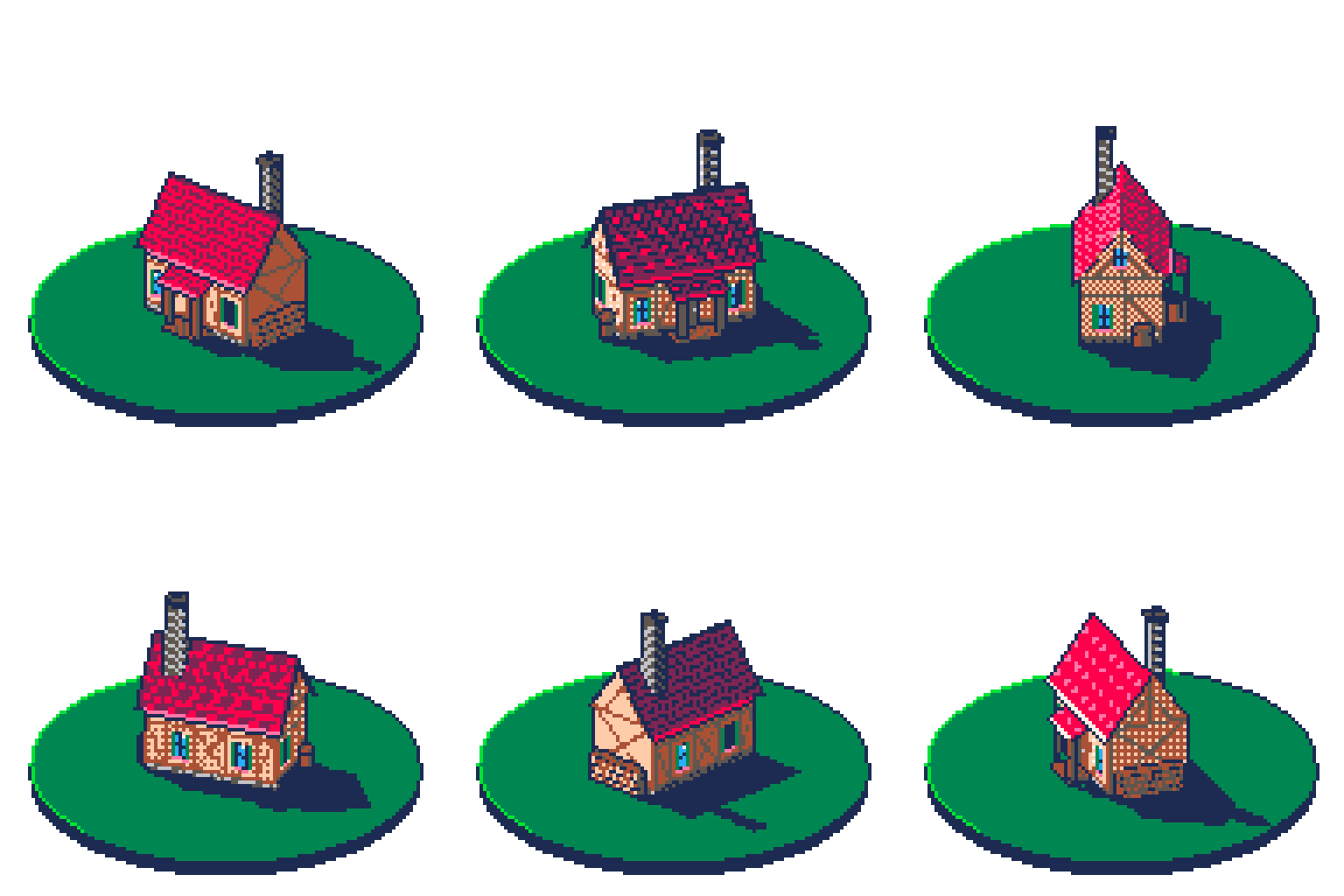
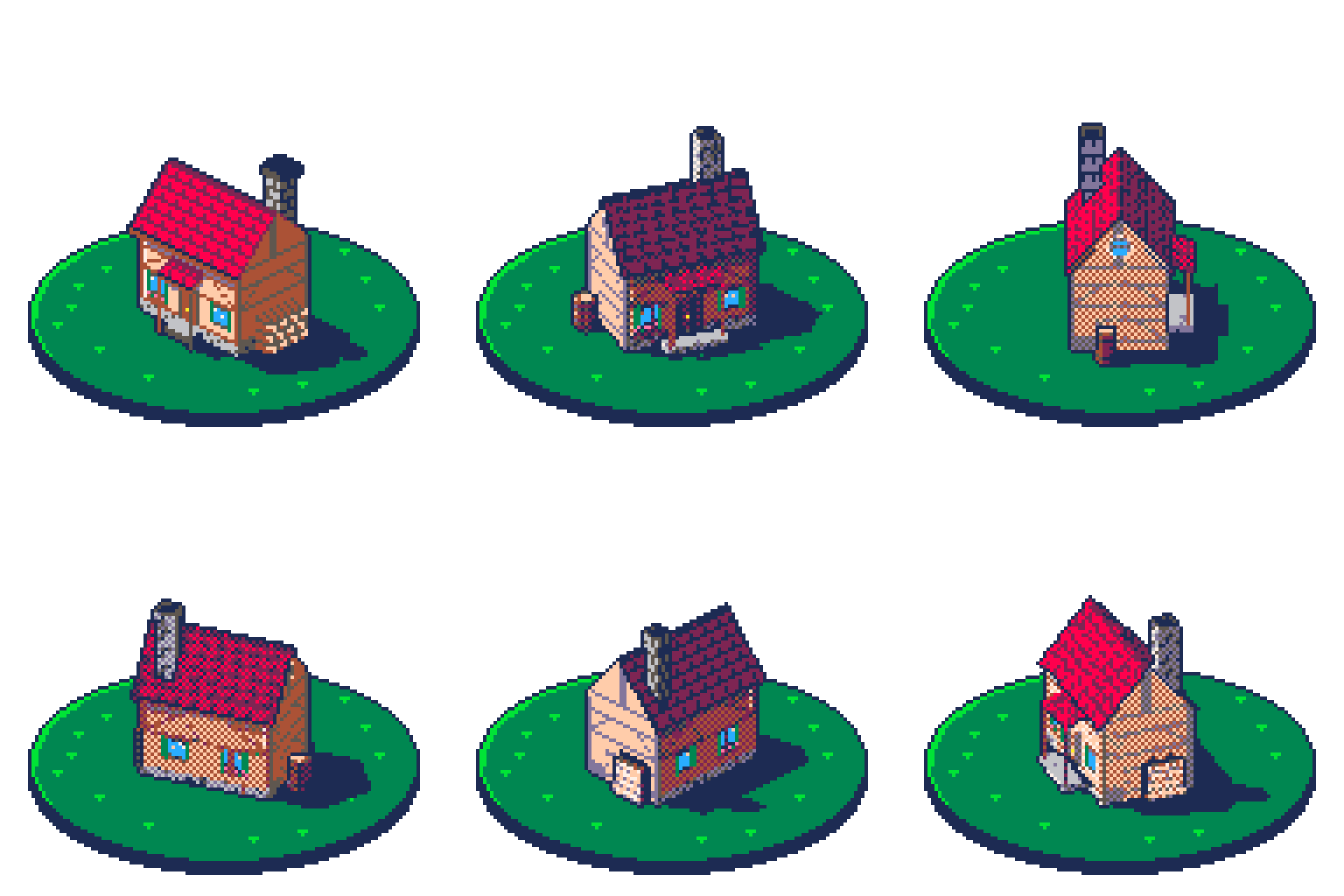
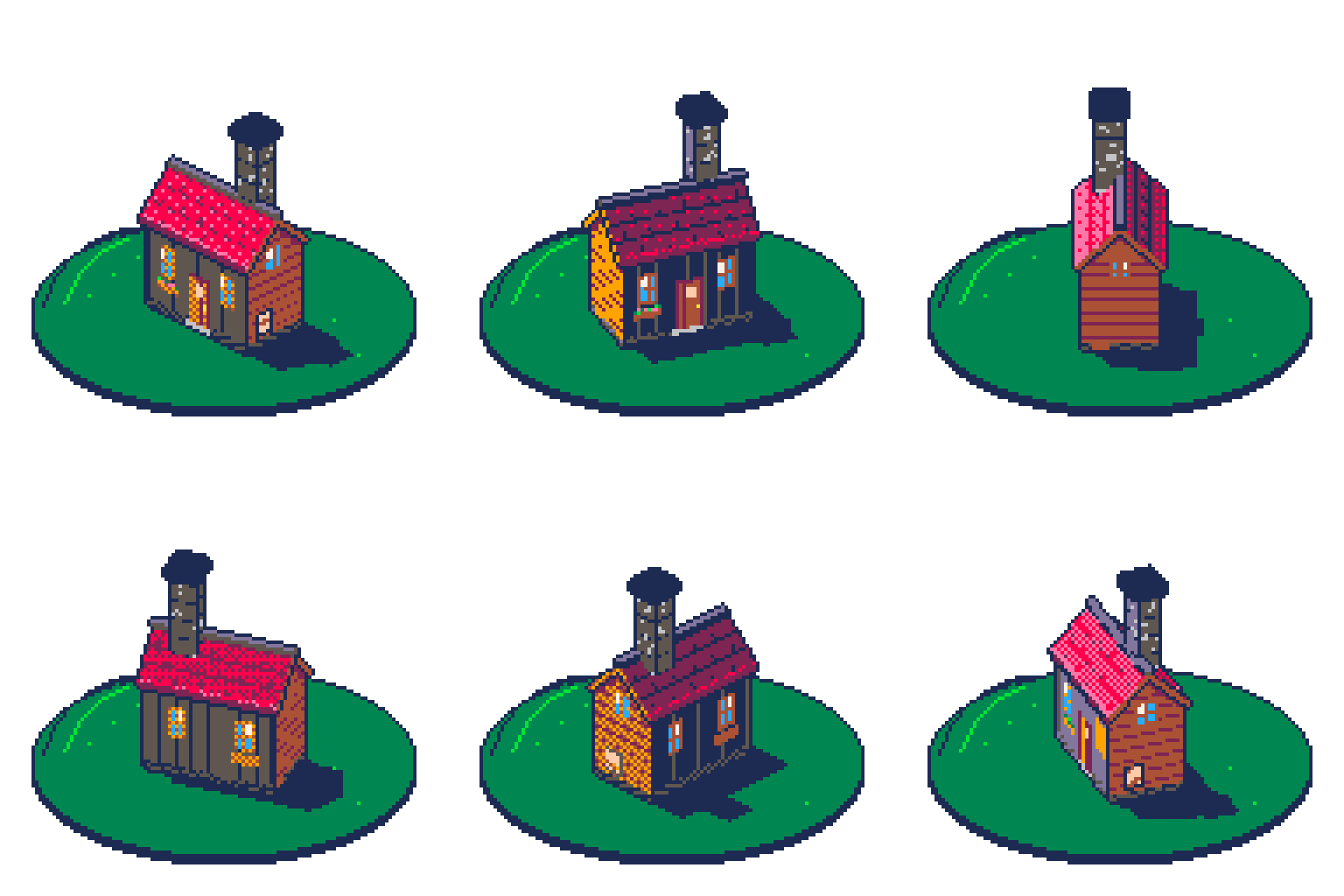
A detailed timber-framed cottage with a porch, on a round grass plinth, drawn in a three-quarter view with a fixed light, then a seamless 360° turntable loop. 3 models got the same prompt. This is what each one drew.
Full ranking
Rows are models, strongest first; columns are plugin versions, newest first. Each cell is the best run's score and its craft rating.
| Model | v0.5.0 |
|---|---|
| claude-opus-5-5 | |
| claude-sonnet-5-5 | |
| gpt-6-luna | |
| Criterion | claude-opus-5-5 v0.5.0 | claude-sonnet-5-5 v0.5.0 | gpt-6-luna v0.5.0 |
|---|---|---|---|
| validate passes with no unaddressed errors (warnings may stand if the report names and justifies them). | Pass validate clean. | Pass validate clean. | Fail Not verified: validate was not run on the saved file. |
| Every colour is on the PICO-8 palette and the palette still has exactly the 16 PICO-8 entries (validate check palette, palette op="get"). | Pass 16 PICO-8 entries. | Pass 16 PICO-8 entries. | Pass 16 PICO-8 entries. |
| The preview reads at a glance as a cottage on a round plinth — walls with timber framing, tiled gabled roof, chimney, porch with door, shuttered windows, flower box, rain barrel, firewood and the round gable window are each distinguishable without the ascii grid. | Pass Timber framing, tiled roof, chimney, porch with door, shutters, flower box, firewood and plinth all read in the preview. | Pass Timber framing, tiled roof, chimney, porch, windows, barrel and firewood read in the preview. | Fail No porch, rain barrel or firewood are distinguishable; walls read as dark planks. |
| The brief is followed: layers exactly ground/shadow/house (sprite_info), three-quarter view with the front wall on the left and the right gable on the right, footprint centred on (64, 90) ±1, a 2:1 elliptical plinth, the chimney on the back slope near the right gable, door on the front wall. | Pass Layers ground/shadow/house; three-quarter view, front wall left, right gable with firewood right; chimney near the right gable. | Pass Layers ground/shadow/house; three-quarter view; chimney near the right gable. | Fail Walls are dark grey/brown instead of cream with timber framing; the chimney sits on the ridge, not on the back slope near the right gable. |
| Verticals are exactly vertical, parallel edges of the box and roof stay parallel on screen, and the roof sits squarely on the walls (look op="ascii" over the cottage). | Pass Verticals vertical; box and roof edges parallel. | Pass Verticals vertical; box and roof edges parallel. | Pass Verticals vertical; box edges parallel. |
| The light reads from behind-left: the visible faces differ in tone in the order the light demands, walls and roof each use at least 3 tones, and the #1d2b53 shadow falls to the right and toward the viewer, attached to the base and entirely on the plinth (look with layer="shadow"). | Pass Front wall lighter than the right gable; #1d2b53 shadow falls right and toward the viewer, on the plinth. | Pass Visible faces differ in tone; shadow falls right and toward the viewer on the plinth. | Fail The dark front wall does not follow a behind-left light. |
| frame op="list" shows exactly 16 frames, every one 125 ms, and tag op="list" shows a forward tag named `spin` covering all of them. | Pass 16 frames × 125 ms, forward tag spin 1–16 (sheet JSON). | Pass 16 frames × 125 ms, forward tag spin 1–16. | Pass 16 frames × 125 ms, forward tag spin 1–16. |
| The `ground` layer is identical on every frame — its cels are linked (cel op="list") or look op="diff" with layer="ground" reports nothing changed. | Pass Plinth unchanged across the frames by eye. | Pass Plinth unchanged by eye. | Pass Plinth unchanged by eye. |
| The footprint's centre stays on (64, 90) ±1 on every frame — the cottage never drifts or bobs (onion skin on `house`). | Pass Centred on the plinth by eye. | Pass Centred on the plinth by eye. | Pass Centred on the plinth by eye. |
| The cottage turns counter-clockwise seen from above by an even step: onion skin shows near-side features sliding right by consistent amounts, frames 3, 7, 11 and 15 each show one side face-on, and frames 5, 9 and 13 are three-quarter views. | Pass Face-on views at frames 3, 7, 11 and 15; three-quarter views at 1, 5, 9 and 13. | Pass Face-on at 3, 7, 11, 15; three-quarter at 1, 5, 9, 13. | Pass Face-on at 3, 7, 11, 15; three-quarter at 1, 5, 9, 13. |
| Wall height, ridge height and chimney height are the same on every frame, and the projected lengths of the walls grow and shrink smoothly with the angle — no frame is squashed, stretched or off model. | Fail The end-on views (frames 7 and 15) are narrower and taller than the other angles. | Fail End-on frames 7 and 15 are narrower and taller than the rest. | Fail End-on frames 7 and 15 are narrower and taller than the rest. |
| Every frame is a true view of the same box: frame 9 shows the back wall's three windows and the rain barrel and is not a mirror of frame 1, each face appears and vanishes edge-on in order, and no frame is a flipped or scaled copy of another (filmstrip, look op="diff"). | Pass Frame 9 shows the back wall's windows and the rain barrel; every side has its own details. | Pass Each side shows its own details; frame 9 is not a mirror of frame 1. | Fail Not verified. |
| Near faces cover far ones on every frame, the door and windows show only while their wall faces the viewer, and the chimney's base is hidden by the ridge while it is on the far slope. | Pass Porch, barrel and firewood appear and hide as their sides turn. | Pass Porch, barrel and firewood appear and hide as their sides turn. | Fail The chimney stays fully visible from every side. |
| The light stays fixed while the cottage turns: a given face changes tone as it turns toward or away from behind-left, and on every frame the visible face turned most toward the light is the brightest — it is not the same shading painted onto a rotating box. | Fail Not verified per face. | Fail Not verified per face. | Fail Not verified. |
| On every frame the shadow falls to the right and toward the viewer, stays attached to the base and on the plinth, and its outline changes with the footprint — longer when a long wall is broadside to the light, shorter when the cottage points into it (onion skin on `shadow`). | Pass The shadow keeps falling right and toward the viewer and changes shape with the footprint. | Pass The shadow stays right and toward the viewer and changes with the footprint. | Pass Shadow stays right and toward the viewer and changes with the footprint. |
| Played on repeat the GIF has no hitch — frame 16 to frame 1 changes about as much, and in the same way, as frame 1 to frame 2 — and frame 1 still matches the step-1 export. | Fail Frame 1 differs from the step-1 export in 1649 pixels — the cottage was redrawn for the turn. | Pass Frame 1 matches the step-1 export pixel for pixel; no visible hitch at the wrap. | Fail Frame 1 differs from the step-1 export in about 2200 pixels. |
| validate passes with no unaddressed errors and the palette is still the 16 PICO-8 entries. | Pass validate clean; palette still 16 entries. | Pass validate clean; palette 16 entries. | Fail Not verified: validate was not run on the saved file. |
Every run
Compare runs3 runs of this prompt, newest first. Runs on an older revision are marked unranked.
3 pieces
How it was tested
Every model gets this prompt word for word, on the same canvas and palette, and draws it in a live Aseprite window. Each criterion is a yes-or-no check on the files it hands back.
A detailed timber-framed cottage with a porch, on a round grass plinth, drawn in a three-quarter view with a fixed light, then a seamless 360° turntable loop. Tests whether a model can hold a 3D form in pixel art: constant volume at every angle, faces that appear and disappear in the right order, shading that follows a light which stays put while the object turns, a cast shadow that changes with the footprint, and correct occlusion.
- validate
- palette
- read
- spec
- geometry
- light
- tagged
- ground
- pivot
- even
- volume
- solid
- occlusion
- shadow
- seamless
- Canvas
- 128×128 RGB
- Palette
- pico8
- Steps
- 2
- Revision
- 2
The steps, verbatim
Step 1:The cottage
The document is already open: 128×128 pixels, RGB, with the PICO-8 palette loaded (16 colours). Use only those 16 colours — do not add, widen or replace the palette. This brief is complete: do not ask me to confirm it. Decide anything it leaves open yourself and list those decisions in your final report. Coordinates below are 0-based pixels, x to the right, y down. Draw ONE frame: a detailed timber-framed cottage standing on a round grass plinth, seen from above at a three-quarter angle, like a product shot on a turntable. A later step will spin it a full 360° around its vertical axis, so it must be a solid, consistent 3D object, not a flat picture — every side must exist. The camera - Fixed, looking down at about 30°. Horizontal circles therefore appear as ellipses twice as wide as they are tall; vertical edges stay vertical on screen. - The rotation axis is vertical and passes through the centre of the cottage's footprint, which sits on screen at (64, 90). Call this the pivot. The plinth - A round grass plinth centred on the pivot: its top is an ellipse about 112×56 px (#008751 with #00e436 on the lit left rim and a few grass tufts that are rotationally symmetric enough not to matter — or none), and its side is a 4 px dark band (#1d2b53) below the front half of the ellipse. It is perfectly round, so it looks the same from every angle. The cottage (sizes in pixels as they would measure face-on) - Main body: a box with a footprint of 40×28 and walls 20 px tall, on a 3 px stone foundation band (#5f574f with #c2c3c7 stones). Cream plaster walls (#ffccaa lit, #ab5236 for the darkest side) crossed by dark timber framing (#ab5236 / #5f574f): corner posts, a beam at mid-height, and diagonal braces. - Roof: gabled, ridge along the 40 px length, rising 14 px above the walls and overhanging every wall by 2 px. Tile rows of red (#ff004d lit, #7e2553 shaded, #000000 only for the darkest edge) with a darker ridge cap. - The four sides are all different, so the turn can be read: - front (a long side): a brown plank door (#ab5236 with a #5f574f frame) in the middle under a small porch — a 14 px wide, 6 px deep lean-to roof on two posts, with one stone step; a shuttered window on each side of the door, the left one with a pink flower box (#ff77a8, #008751); - back (the other long side): three square blue windows (#29adff with a #fff1e8 glint) and a round wooden rain barrel at the right corner; - left gable end: a round attic window under the roof peak and one ground-floor window; - right gable end: no windows, a stacked firewood pile (#ab5236, #ffccaa log ends) against the wall. - A grey brick chimney (#5f574f, #c2c3c7 lit) with a dark cap stands on the back slope of the roof near the right gable, rising 8 px above the ridge. - The porch, barrel, firewood and chimney stick out of the box, so they must turn with it and hide behind it like real objects. - Orientation for this frame: turn the cottage so that the front wall faces the viewer on the left and the right gable faces the viewer on the right, at roughly 45° each — the classic three-quarter view. Call this angle 0°. Light and shadow - One light, high up, behind the cottage and to its left. It never moves. Of the faces you can see, the one turned most toward it is the brightest and the one turned most away is the darkest; faces in between are in between. Use at least 3 tones on the walls and 3 on the roof. - The cottage casts a solid shadow (#1d2b53) on the plinth top, falling to the right of the cottage and toward the viewer. The shadow starts at the base of the walls and its outline follows the cottage's footprint and roof outline projected onto the ground. Keep it entirely on the plinth. Style - Selective dark outline: #000000 or #1d2b53 on the outer silhouette, coloured lines inside. No anti-aliasing against transparency, no stray pixels. Transparent background outside the plinth. - Parallel edges of the box stay parallel on screen. Verticals are exactly vertical. Layers, exactly these names, bottom to top: `ground` (the plinth), `shadow` (only the cast shadow), `house` (the cottage, chimney included). No other layers. Before you finish: look at the result, run validate, and fix what it reports. In your final report, give the screen coordinates of the four bottom corners of the main body, the colours used for each face, and any decision you made that the brief did not specify.
new sessionStep 2:The turntable
The open document holds a cottage on a round grass plinth (canvas 128×128, PICO-8 palette, layers `ground`, `shadow`, `house`) in a three-quarter view at angle 0°, with a fixed light from behind-left. Keep the palette — use only its 16 colours — and keep the cottage on model at every angle: same size, proportions, colours and details. This brief is complete: do not ask me to confirm it. Decide anything it leaves open yourself and list those decisions in your final report. Coordinates are 0-based pixels, x to the right, y down. Animate a turntable: the cottage turns one full revolution around the vertical axis through the pivot (64, 90), and the animation loops forever with no hitch. Exactly 16 frames, every frame 125 ms (one full turn every 2 seconds), one tag named `spin` covering every frame, direction forward. The existing frame is frame 1. The rotation - Frame k shows the cottage turned (k − 1) × 22.5° from frame 1 — an even step every frame. Frame 16 is at 337.5°, so playing frame 16 into frame 1 is exactly one more step. - It turns counter-clockwise as seen from above: features on the near side slide to the right across the screen. - Every frame is a real view of the same box from a new angle. Each face grows, narrows and disappears as its angle to the camera changes; a face seen edge-on is one line wide or gone. Wall height, ridge height, chimney height and the porch's size stay the same on every frame. Frames 5, 9 and 13 are the other three three-quarter views; frames 3, 7, 11 and 15 each show one side face-on, with the ridge running across the screen or straight toward the viewer. - Never produce a frame by flipping, mirroring or stretching another frame: the cottage's four sides are different, so a mirrored frame shows the wrong details. - The footprint's centre stays on the pivot on every frame — the cottage does not wander. - Occlusion is correct on every frame: near faces cover far ones, the door, porch, windows, barrel and firewood are only visible while their side faces the viewer (or stick out past the silhouette), and when the chimney is on the far side of the ridge, its base is hidden behind the roof. The light stays put - The light does not turn with the cottage. On every frame, re-shade each wall and roof plane by its current angle to the light: the face turned toward behind-left is the brightest, and a face that turns away from the light gets darker frame by frame. - The shadow is recomputed on every frame, not rotated as a picture: it always falls to the right of the cottage and toward the viewer, it stays attached to the base of the walls, and its outline changes with the footprint — longest when a long wall is broadside to the light, shortest when the cottage points into it. Only `shadow` carries it, and it stays on the plinth. What stays still: `ground` is identical on every frame. Link its cels. Before you finish: check the whole turn as a filmstrip, check the house and the shadow with onion skin, compare frame 16 against frame 1, and confirm that frame 9 is not a mirror of frame 1. Run validate and fix what it reports. In your final report, list for each frame which faces are visible, and give the brightest and darkest wall colour on frames 1, 5, 9 and 13.
Setup rules
- Step 1 starts from a new document created with sprite_manage op="new" width=128 height=128 colorMode="rgb", then palette op="preset" preset="pico8" replace=true. The operator does this before handing over the step text.
- Hand the model exactly the step text — no reference image, no 3D render, no extra steering beyond the server's own instructions and skills.
- One session per step. Step 2 runs in a fresh session against a copy of the step-1 result; the operator keeps the step-1 PNG export to compare frame 1 against.
- If the model offers to generate a concept image, a pixel-only run answers "No reference, continue from the text." A run that does use one is declared in `references` and ranked on its own row. Either answer is recorded as an intervention.
- Do not intervene mid-run unless the model asks a genuine clarifying question, and record it under the step's interventions.
17 criteria
Step 1: The cottage
- validate passes with no unaddressed errors (warnings may stand if the report names and justifies them).
- Every colour is on the PICO-8 palette and the palette still has exactly the 16 PICO-8 entries (validate check palette, palette op="get").
- The preview reads at a glance as a cottage on a round plinth — walls with timber framing, tiled gabled roof, chimney, porch with door, shuttered windows, flower box, rain barrel, firewood and the round gable window are each distinguishable without the ascii grid.
- The brief is followed: layers exactly ground/shadow/house (sprite_info), three-quarter view with the front wall on the left and the right gable on the right, footprint centred on (64, 90) ±1, a 2:1 elliptical plinth, the chimney on the back slope near the right gable, door on the front wall.
- Verticals are exactly vertical, parallel edges of the box and roof stay parallel on screen, and the roof sits squarely on the walls (look op="ascii" over the cottage).
- The light reads from behind-left: the visible faces differ in tone in the order the light demands, walls and roof each use at least 3 tones, and the #1d2b53 shadow falls to the right and toward the viewer, attached to the base and entirely on the plinth (look with layer="shadow").
Step 2: The turntable
- frame op="list" shows exactly 16 frames, every one 125 ms, and tag op="list" shows a forward tag named `spin` covering all of them.
- The `ground` layer is identical on every frame — its cels are linked (cel op="list") or look op="diff" with layer="ground" reports nothing changed.
- The footprint's centre stays on (64, 90) ±1 on every frame — the cottage never drifts or bobs (onion skin on `house`).
- The cottage turns counter-clockwise seen from above by an even step: onion skin shows near-side features sliding right by consistent amounts, frames 3, 7, 11 and 15 each show one side face-on, and frames 5, 9 and 13 are three-quarter views.
- Wall height, ridge height and chimney height are the same on every frame, and the projected lengths of the walls grow and shrink smoothly with the angle — no frame is squashed, stretched or off model.
- Every frame is a true view of the same box: frame 9 shows the back wall's three windows and the rain barrel and is not a mirror of frame 1, each face appears and vanishes edge-on in order, and no frame is a flipped or scaled copy of another (filmstrip, look op="diff").
- Near faces cover far ones on every frame, the door and windows show only while their wall faces the viewer, and the chimney's base is hidden by the ridge while it is on the far slope.
- The light stays fixed while the cottage turns: a given face changes tone as it turns toward or away from behind-left, and on every frame the visible face turned most toward the light is the brightest — it is not the same shading painted onto a rotating box.
- On every frame the shadow falls to the right and toward the viewer, stays attached to the base and on the plinth, and its outline changes with the footprint — longer when a long wall is broadside to the light, shorter when the cottage points into it (onion skin on `shadow`).
- Played on repeat the GIF has no hitch — frame 16 to frame 1 changes about as much, and in the same way, as frame 1 to frame 2 — and frame 1 still matches the step-1 export.
- validate passes with no unaddressed errors and the palette is still the 16 PICO-8 entries.